MS-SharePoint policy restore error (2804) .
Hello, I am trying to restore SharePoint single item (GRT option) but suddenly i start receiving 2804 on job logs " MS-SharePointpolicyrestoreerror (2804) . and from Sharepoint server side the below event viewer is registered (Event ID 4971) "Cannot update database on SQL Server instance 'SQL Server name'. Database is read/only. Additional error information from SQL Server is included below. Failed to update database "NBURestore_1720770717" because the database is read-only. from SQL server side:event ID 17053:DoDevIoCtlOut() DeviceIoControl() : Operating system error 50(The request is not supported.) encountered.153Views0likes2Comments
command: bperror
Hello, I noticed when trying to execute the command bperror -client clientname -d startdate -e enddate ecc, that the output only shows backup with a maximum of 5 days before the specified end date. Even if I use the parameter -hoursago instead of the date, it only shows 5 days before. In the Activity Monitor (Windows), I can go back several days. Atm we are still using Netbackup 9.1.0.1, but will soon be upgrading to 10.4. However, I use the command in a script, which outputs / sends a simple report for only one customer. Atm is the report created with OPSCenter and itsn not profitable for us to buy the IT Analytics addon for the future. I went through some other threads in the Netbackup community and googled the problem but haven't found a solution for this strange problem. I also checked the netbackup config, but there seams everything ok. Maybe someone has a advice or any additional input to help identify the issue.149Views0likes2CommentsImage Duplication Backlog
Hello everyone! I've only recently started working with NetBackup and I've been dealing with it a few weeks now. Now, onto my question regarding duplication and its backlog. Over the weekend, many duplications piled up due to errors or due to the closing of the time window, resulting in them going into an error state. However, these are executed as new jobs until the image is successfully duplicated, which fills up the queue. Regardless of the cause, is there a command or, better yet, a way for me to check if the images causing the errors are present in this job so I can abort them? Thank you in advance for your feedback! Best regards, M381Views0likes2Comments
Drive Address 1 is already occupied by drive
Hello, We just lost the 2 guys that were taking care of Netbackup for us and I (no experience) am trying to pick up the slack / learn. Backups that have been running fine for many months stopped running with the two tape drives showing as down. They told me if I saw that the quick fix is to delete the tape / robot, reboot, and add it back. However, when I use the Configure Storage Devices wizard after doing this I can not attach the 2 drives (see attachments). The message is "Drive Address 1 is already occupied by a drive" I went through some other threads in this forum and conducted Google searches but nothing from that is sticking out as a possible fix. Any advice on any additional commands to run to help identify the underlying issue that needs addressed.185Views0likes4Comments
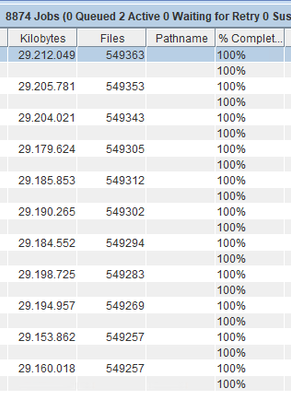
How do I know how much backup was made in the JOB?
I'm going to add a new client to the backup and I need to know the size of the backup that was made and monitor over the days what the size of the next backups will be throughout the week. How do I see the size of the backup made on the day in a virtual machine JOB? Does it always back up 29Gb? Is the saved backup 29Gb every time?199Views0likes2Commentslogin credentials or certificate unable to connect to S3
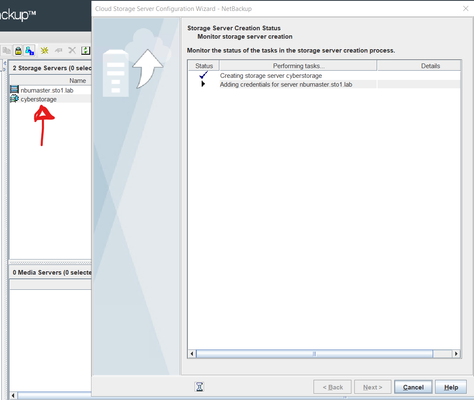
Hi guys, I've been having a problem with credentials in Netbackup 10.4. I want to connect Netbackup with S3 but it doesn't work. Netbackup said "Login credentials or certificate verification failed for server [server_name]. Please see tpconfig for further details. However, looks like it's creating. How to see on image below: But something happens that fails to cause the credentials. How to see on image below: Can someone help me? I appreciate any help in advance.227Views0likes2Comments
HTTP OPTIONS Method
Hi all, After a security scan, recommendations appeared on the master server to disable the “HTTP OPTIONS Method”. Veritas document 100060605 recommends doing this by setting: C:\Program Files\Apache Software Foundation\Apache24\Conf\hpptd.conf… But, in my case, C:\Program Files\Apache Software Foundation\ is missing. How can I disable the “HTTP OPTIONS Method” in this case? Andrii242Views0likes2Comments
Get-BEBackupDefinition not showing all results
Giving BEMCLI a test with a view to automating switching duplicate jobs to new S3 buckets every 3 months. Get-BEBackupDefinition in conjuction withSet-BEDuplicateStageBackupTask seems to be exactly what is required from the examples in the help guide... Get-BEBackupDefinition "Backup Definition 01" | Set-BEDuplicateStageBackupTask -Name "Duplicate 2" -Storage "Any disk storage" | Save-BEBackupDefinition However, runningGet-BEBackupDefinition only returns a few results (from what i can see only agent based jobs). None of the VM based jobs show up. Running Get-BEJob shows everything as expected. Any pointers on how to use bemcli/powershell to automate changing jobs to use the new s3 bucket?150Views0likes0Comments